
The difference between Pixels and Vectors?

Pixels and Vectors are two types of computer graphics that are used in creating artwork. Each can be used entirely on their own or in conjunction with each other.
Pixels are small squares of colour which create an image. If you zoom in on an image, you can see small squares of colours which are pixels.
Vectors graphics are lines and curves which are created using mathematical equations. When you zoom in close on a vector, the detail will remain sharp.
What are Pixels?
Computer-generated images use millions of pixels to create photographic images. The pixels are tiny squares of colour that make up the image. Images created in pixels will usually be in the following formats, jpeg, jpg, tiff, PSD. PSD is short for Adobe Photoshop, which is an industry-standard design software package. Image files that contain pixels are usually big files that take up a lot of hard disk memory. It’s not uncommon for a Photoshop file to be over one Gigabyte in size.
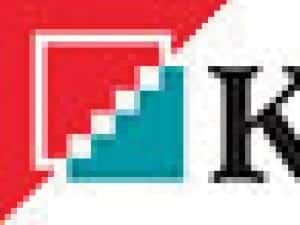
How pixels appear when close up
It’s mind-blowing to imagine, but when you take a picture on the latest iPhone, the image is generated from 12 million pixels. When you press the image capture button, your iPhone creates 12 million assorted squares, all different in colours, creating a 12mp image in less than a second. This year, a news story announced the invention of the world’s largest camera, which creates images of 3,200 megapixels, or 3.2 billion pixels, and so sensitive it can see a lit candle from one thousand miles away. Mind blown!!
It’s a misconception brought on by television that images can be easily enhanced by computer software. You’ll see in the movies somebody zooming in on a CCTV image and generating a close-up pixel-perfect image. Enhancing poor quality images is a myth and is not possible. When your image starts at low quality, you cannot improve the quality by making it larger or increasing the DPI. Software like Photoshop will allow you to increase the size of the image using a process called resampling. Resampling fills in the gaps meaning the software guesses what the pixel colour should be within the gaps. Resampling creates a larger, more blurry image of the original, meaning it can’t be of better quality. Sometimes though, the effect of resampling will suffice as you might be wanting your image to be used as a background with a slight blur filter. Using a filter over the top can create some nice effects.

Small image resampled into a larger image

Resampled image of town centre in background uses a low quality image which has been resampled and blurred. Good quality images of banners overlaid on top to create the desired effect
If you require crisp photographic quality, you will need to create artwork with high-resolution images. High resolution means high DPI or Dots per Inch. You can find High-quality stock images on a range of websites such as Istock, Shutterstock etc.
What are vector graphics?
Most logos are created in a vectored format. Vector graphics can scale to any size without distorting, making them perfect for any printing type, whether the requirement is banner printing, letterheads, or signwriting. Vectors are computer-generated paths, lines and shapes and use mathematical equations with point positions calculated using numerical coordinates. Lines or paths, as they are otherwise known, are simple shapes with sharp, crisp edges. Because vectors graphics use coordinates of point positions, the file sizes are usually much smaller than files that contain pixels.
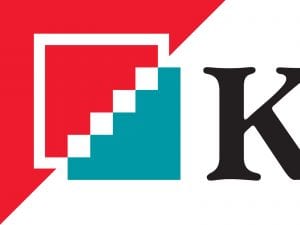
How vector graphics appear when close up
Vector graphics are usually solid colours, gradients or lines and have sharp edges. Over the years, Vector graphics have become more complicated, and there are some fantastic effects on offer, but most of the same principles remain with a vector mostly consisting of paths, shapes and points. Most vectors created by design software will be in these formats, Ai format, Adobe Illustrator, PDF, SVG, EPS.
Vector graphics, unlike Pixels, can be sized to any dimension or scale. Vectors are made from lines; you won’t lose any sharpness or quality when zooming in close.
How can I tell if my artwork is Pixels or Vector?
The quickest way to find out if your artwork is in pixels or vectors is to open the file on a computer and zoom in close. When you start to zoom in, and you can see that your artwork is made of small squares, you have an image file that is pixels. Open the file, zoom in, and see crisp sharps lines, then you have a vector file. The vector file can be sized to any scale without distortion. It’s an idea when you are employing the services of a graphic designer to make sure that they create and supply your logo in a vector format.
Sometimes clients will send us files that they think are vectored when in fact, they are pixels. You can have PDF or Adobe Illustrator Files that have images embedded in them. If you are ever unsure, the best thing to do is open the file and zoom in. If you see crisp lines, your file is vectored; if you see small blocks, your artwork is created in pixels.
Leave a Reply
You must be logged in to post a comment.